Introduction
- What makes Dolby Atmos different from standard surround sound
- Why Dolby Atmos has become the gold standard in cinematic audio
What Is Dolby Atmos?
- Brief history and launch
- How it expands on traditional surround sound
- Object-based audio explained
How Does Dolby Atmos Work?
- Speaker configuration (height channels, overhead effects)
- The concept of audio objects
- Comparison to standard 5.1 or 7.1 setups
Dolby Atmos in the Cinema vs. At Home
- Differences in experience
- How studios mix soundtracks in Atmos
- How home technology replicates that cinema feel
Dolby Atmos at Home: The Essentials
- What equipment you need
- Compatible AV receiver
- Atmos-enabled speakers or soundbars
- Streaming devices, Blu-ray players
- Recommended setups (5.1.2, 7.1.4, etc.)
Atmos Speaker Placement Explained
- Ceiling-mounted vs. upward-firing speakers
- Positioning tips for immersive sound
- Height speaker guidelines
Dolby Atmos with Soundbars
- Are soundbars a real Atmos experience?
- Best soundbar features to look for
- Limitations and benefits
Streaming Services That Support Dolby Atmos
- Netflix, Disney+, Apple TV+, Amazon Prime Video
- Content availability and subscription requirements
- How to enable Atmos on your streaming device
Gaming in Dolby Atmos
- Xbox Series X/S and PC support
- Games that offer Atmos
- What you need to enable Atmos for gaming
Dolby Atmos Music
- What is spatial audio?
- Apple Music, TIDAL, Amazon Music HD support
- How to listen with headphones or speakers
How to Tell If You’re Really Hearing Dolby Atmos
- TV or receiver display indicators
- Settings to check in your streaming apps and hardware
- Common setup mistakes to avoid
Do You Need a 4K TV for Dolby Atmos?
- Separating audio from video capabilities
- HDMI ARC vs. eARC
Common Myths About Dolby Atmos
- “You need a full speaker setup”
- “Atmos is only for home theaters”
- “All content has Atmos”
Is Dolby Atmos Worth It?
- Real-world benefits
- When it makes the biggest difference
- Who should invest in it
Conclusion
- Recap of what Dolby Atmos offers
- Encouragement to try Atmos at your own level
FAQs
- Can I get Dolby Atmos with headphones?
- What’s the difference between DTS:X and Dolby Atmos?
- Is Dolby Atmos just louder surround sound?
- Do I need new HDMI cables for Atmos?
- Can I upgrade my current system to support Atmos?
Dolby Atmos Explained : Introduction
Ever watched a movie and felt like a helicopter flew right over your head? Or heard rain fall not just around you, but above you? That’s Dolby Atmos in action. It’s not just the latest buzzword in home entertainment—it’s a game-changing audio technology that brings a whole new dimension to your listening experience.
Unlike traditional surround sound, Dolby Atmos doesn’t just move sound around you; it adds height, turning audio into a 3D space. Whether you’re streaming your favorite series, gaming, or listening to music, Dolby Atmos can make everything sound more immersive, realistic, and flat-out epic.
Let’s break down what it is, how it works, and how you can bring it into your home—even if you’re not an audio expert.
What Is Dolby Atmos?
Launched in 2012 by Dolby Laboratories, Dolby Atmos was initially developed for cinematic audio in movie theaters. It debuted with the film Brave and quickly spread to major cinema chains worldwide.
But what makes it so revolutionary?
Traditional surround sound systems—like 5.1 or 7.1 setups—use channel-based audio. This means specific sounds are assigned to specific speakers. With Dolby Atmos, sound is treated as objects that can be placed and moved anywhere in a 3D space—including overhead.
So instead of thinking, “This sound comes from the left speaker,” Dolby Atmos lets creators say, “This sound comes from above and moves to the right.” It’s object-based audio, and it changes everything.
How Does Dolby Atmos Work?
At the heart of Dolby Atmos is its object-based audio engine. This system allows sound engineers to position up to 128 individual audio objects in a scene. Instead of being locked to channels, sounds can move freely in space.
But how does that translate to your living room?
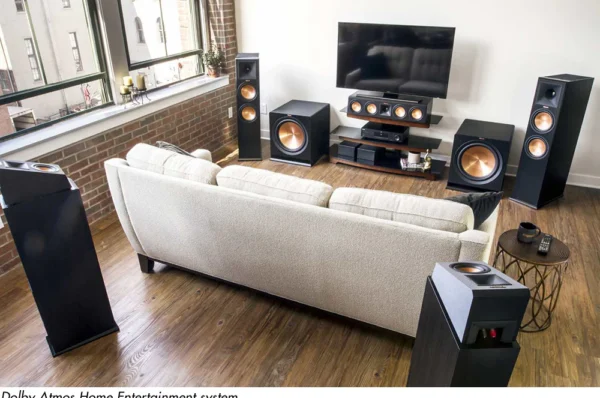
You need height speakers—either installed in the ceiling or built into floor-standing speakers as upward-firing drivers. These bounce sound off your ceiling to simulate vertical effects. Your receiver decodes the Dolby Atmos signal and maps each sound object to the appropriate speaker, creating a dome of sound around you.
It’s especially powerful in action scenes—think jets flying overhead or bullets whizzing past. But even subtle moments, like birds chirping above in a nature documentary, feel more real.
Dolby Atmos in the Cinema vs. At Home
Dolby Atmos began in commercial cinemas, where theaters may have 64 or more speakers around the room and ceiling. That’s obviously not practical at home—but Dolby knew that.
That’s why they created home Atmos solutions using 5.1.2, 7.1.4, and even soundbar-based systems. While you won’t get the full cinema effect, a well-setup home Atmos system gets impressively close.
And with most major streaming platforms supporting Atmos content, you don’t need Blu-rays or fancy media servers to enjoy it.
Dolby Atmos at Home: The Essentials
Here’s what you’ll need to experience Dolby Atmos at home:
- AV Receivers with Dolby Atmos Support
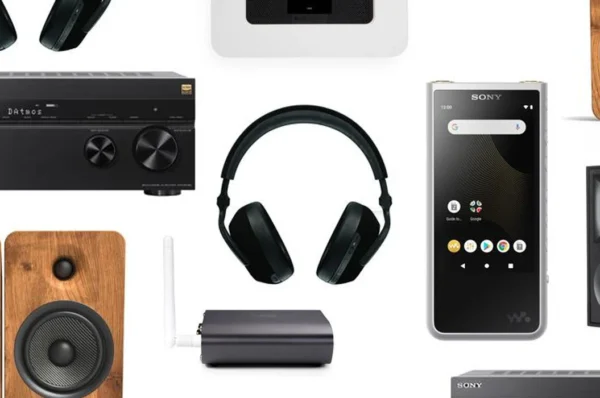
Most modern mid-range receivers from Denon, Yamaha, Onkyo, Marantz, etc., support Atmos out of the box. - Speakers with Height Capability
- Ceiling-mounted speakers: Best for pure overhead effects.
- Upward-firing speakers: Easier to install; bounce sound off the ceiling.
- Dolby Atmos-Enabled Soundbar
Ideal for small rooms or those who want a simpler setup. Many include upward-firing drivers and subwoofers in one unit. - Compatible Source Device
A 4K Blu-ray player, streaming box (like Apple TV 4K, Fire TV Cube, Nvidia Shield), or gaming console that supports Atmos. - Content that supports Atmos
Streaming services like Netflix, Disney+, and Apple TV+ have tons of Atmos content.
Atmos Speaker Placement Explained
Dolby recommends setups like:
- 5.1.2: Five standard speakers + one subwoofer + two height speakers
- 7.1.4: Seven speakers + one subwoofer + four height speakers
Height speaker placement tips:
- If using upward-firing modules, ensure your ceiling is flat and reflective (8-14 feet high is ideal).
- If installing in-ceiling, aim the speakers slightly toward the listening position.
Don’t have ceiling access? Don’t worry—upward-firing modules are surprisingly effective when placed correctly.
Yes, soundbars can deliver Dolby Atmos—but with some caveats.
High-end Atmos soundbars from brands like Sonos (Arc), Samsung (Q-Series), LG, and Bose come with:
- Up-firing drivers for height effects
- Built-in or wireless subwoofers
- Rear surrounds (on some models)
While not quite as immersive as a full speaker setup, a good Atmos soundbar can transform your TV experience without running cables everywhere.
Streaming Services That Support Dolby Atmos
Several major platforms now stream Atmos content:
- Netflix (Premium plan required)
- Disney+
- Apple TV+
- Amazon Prime Video
- HBO Max
- Paramount+
Make sure:
- You’re using a compatible streaming device
- Your AV receiver or soundbar supports Atmos
- The title has the Dolby Atmos label
Tip: Look for the Dolby Atmos logo before pressing play!
Gaming in Dolby Atmos
Gamers, rejoice—Atmos isn’t just for movies.
Xbox Series X/S and Xbox One fully support Dolby Atmos for games like:
- Gears 5
- Call of Duty: Modern Warfare
- Ori and the Will of the Wisps
Windows 10/11 PCs also support Atmos with the Dolby Access app.
While PlayStation doesn’t natively support Atmos in games yet, many Blu-ray and streaming apps on the console can output Atmos for movies and TV.
Dolby Atmos Music
Yes, Dolby Atmos isn’t just for movies—it’s changing music, too.
Dolby Atmos Music is a spatial audio format that creates an immersive listening experience with:
- Instruments placed around and above you
- A more live, “being-there” feel
Platforms that support it:
- Apple Music (Spatial Audio)
- TIDAL HiFi Plus
- Amazon Music HD
You can experience it through:
- Atmos-enabled soundbars or receivers
- Apple AirPods Pro/Max with Spatial Audio
- High-end headphones using Dolby Access on PC
How to Tell If You’re Really Hearing Dolby Atmos
To confirm you’re getting Atmos:
- Check your receiver display—it should show “Dolby Atmos”
- On soundbars, look for the Atmos light or check the app
- In streaming apps, verify that Atmos is selected in audio settings
Common issues:
- Using HDMI ARC instead of eARC
- Streaming through a TV that doesn’t pass Atmos
- Playing content without Atmos support
Do You Need a 4K TV for Dolby Atmos?
Nope! Dolby Atmos is audio-only, so a 1080p TV works just fine. However:
- TVs with eARC (enhanced ARC) can send lossless Atmos audio to your sound system
- Regular ARC may limit Atmos to compressed versions
If you’re upgrading your setup, choose a TV with eARC support for future-proofing.
Common Myths About Dolby Atmos
Let’s bust a few:
- “You need a full speaker setup”: Not true. Atmos soundbars or even headphones can deliver immersive effects.
- “Atmos is only for movies”: Nope—music and games are in on it too.
- “All content has Atmos”: Only select titles are mixed in Atmos. Look for the badge!
Is Dolby Atmos Worth It?
If you love movies, games, or music, absolutely. It offers:
- Greater immersion
- Heightened realism
- A more exciting experience overall
Even if you’re on a budget, an Atmos-compatible soundbar can give you a solid taste of what it offers. And if you’re a serious cinephile? A full-blown Atmos speaker setup will blow you away.
Conclusion
Dolby Atmos isn’t just a trendy feature—it’s a revolution in how we experience sound. Whether you’re installing a full home theater or upgrading your living room TV with a soundbar, Atmos brings an unmatched level of immersion and realism.
It’s accessible, scalable, and more supported than ever. So go ahead—step into the future of sound. Your ears will thank you.
FAQs
1. Can I get Dolby Atmos with headphones?
Yes! Many headphones support Atmos through services like Apple Music (Spatial Audio) or PC apps like Dolby Access.
2. What’s the difference between DTS:X and Dolby Atmos?
Both are object-based surround formats, but Dolby Atmos has wider content and hardware support.
3. Is Dolby Atmos just louder surround sound?
No. Atmos adds directional height and more precise sound placement for a 3D experience.
4. Do I need new HDMI cables for Atmos?
If you’re using HDMI eARC, a High-Speed or Ultra High-Speed HDMI cable is recommended.
5. Can I upgrade my current system to support Atmos?
If your AV receiver supports Atmos, you can often add height speakers or modules. Otherwise, a new receiver or soundbar is needed.